 AAI
AAIAtelier Audio Ircam
Un patch Max pédagogique pour transformer le son en quelques clics, sans aucune connaissance préalable. Pour tout musicien. A pedagogical Max patch to transform sound in just a few clicks, with no prior knowledge required. For any musician.
Qu'est-ce que ?
About
Qu'est-ce que AAI ?
What is AAI?
AtelierAudioIrcam (AAI) est un logiciel servant à transformer des sons à l'aide de différents traitements. Son interface se veut simple et intuitive, et il s'adresse à tout musicien.
Il a été développé sous Max de 2008 à aujourd'hui, dans le but d'accéder en quelques clics, et sans aucune connaissance préalable, à des modules de transformations dans le cadre d'ateliers sur la transformation de la voix, de création sonore à partir de sons pré-enregistrés.
AtelierAudioIrcam a été utilisé dans les conservatoires, mais également dans de nombreux ateliers organisés par l'Ircam avec l'Éducation Nationale : notamment les Ateliers de la Création, projet national destiné aux élèves de lycées professionnels.
Plus récemment, il a été la pierre angulaire d'un projet pédagogique destiné aux professeurs de conservatoire : une série de cours qui vise à initier et autonomiser les professeurs à la musique mixte et à l'utilisation des transformations en temps réel, dans une visée pédagogique.
AtelierAudioIrcam (AAI) is a software designed to transform sound using a range of audio effects. Its interface aims to be simple and intuitive, and is meant for any musician.
It has been developed in Max from 2008 to the present, with the goal of providing access — in just a few clicks and with no prior knowledge required — to transformation modules used in workshops on voice transformation and sound creation from pre-recorded material.
AtelierAudioIrcam has been used in conservatories, as well as in many workshops organised by Ircam with the French Ministry of Education: in particular the "Ateliers de la Création", a national programme aimed at vocational high school students.
More recently, it has become the cornerstone of an educational project for conservatory teachers: a series of courses introducing them to mixed music and the pedagogical use of real-time audio transformations.
Étape 1
Step 1
Installation
Installation
AAI est distribué sous la forme d'un patch Max et nécessite Max 9.
AAI is distributed as a Max patch and requires Max 9.
Qu'est-ce que Max ? Max est un logiciel de programmation créé à l'origine par l'Ircam, qui permet de fabriquer des « patches » pour concerts, installations, etc. Il est gratuit sur Mac comme sur Windows : au premier téléchargement, Max 9 est accessible sans restriction pendant 30 jours, puis les options d'édition deviennent payantes — dont vous n'aurez pas besoin pour utiliser AAI.
What is Max? Max is a programming environment originally created at Ircam, used to build "patches" for concerts, installations and more. It is free on both Mac and Windows: on first download, Max 9 is fully unrestricted for 30 days, after which some editing features become paid — features you won't need to use AAI.
Installer Max
Install Max
Téléchargez la dernière version de Max sur le site de Cycling 74, puis installez-la en suivant les instructions.
Download the latest version of Max from the Cycling 74 website, then install it following the instructions.
Installer AAI
Install AAI
Téléchargez la dernière version de AAI, puis dézippez le document téléchargé.
Download the latest version of AAI, then unzip the downloaded file.
Étape 2
Step 2
Premier lancement
First launch
- Ouvrez Max 9.
- Open Max 9.
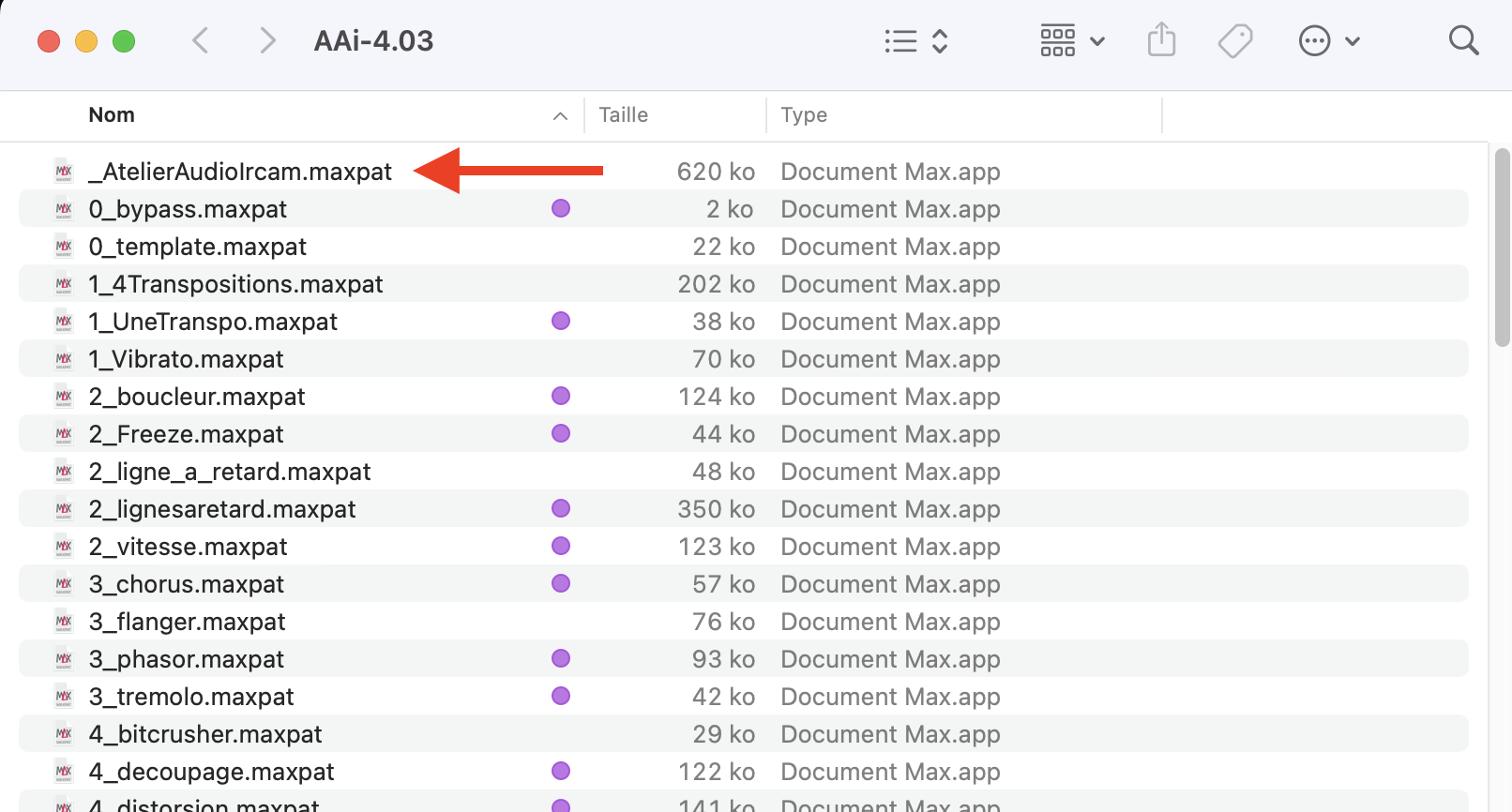
- Depuis Max, ouvrez le document nommé
_AtelierAudioIrcam.maxpat. - From Max, open the document named
_AtelierAudioIrcam.maxpat.
À ce moment-là, macOS et Max affichent des messages de sécurité un peu inquiétants. C'est normal et sans danger — mais ne fermez rien au hasard. Suivez la section Dépannage macOS juste en dessous, surtout si vous êtes sur un Mac récent (puce Apple).
At this point, macOS and Max display a few alarming-looking security warnings. This is normal and harmless — but don't dismiss them at random. Follow the macOS troubleshooting section just below, especially on a recent (Apple-chip) Mac.
Bon à savoir
Good to know
Dépannage macOS
macOS troubleshooting
AAI utilise des objets (« externals ») qui ne sont pas signés par Apple. macOS et Max affichent donc, à la première ouverture, des messages de sécurité. Rien de dangereux — voici comment passer sans casse.
AAI uses objects ("externals") that are not signed by Apple. So, on first launch, macOS and Max display security warnings. Nothing dangerous — here's how to get through them safely.
1. Les deux fenêtres qui peuvent apparaître
1. The two dialogs you may see
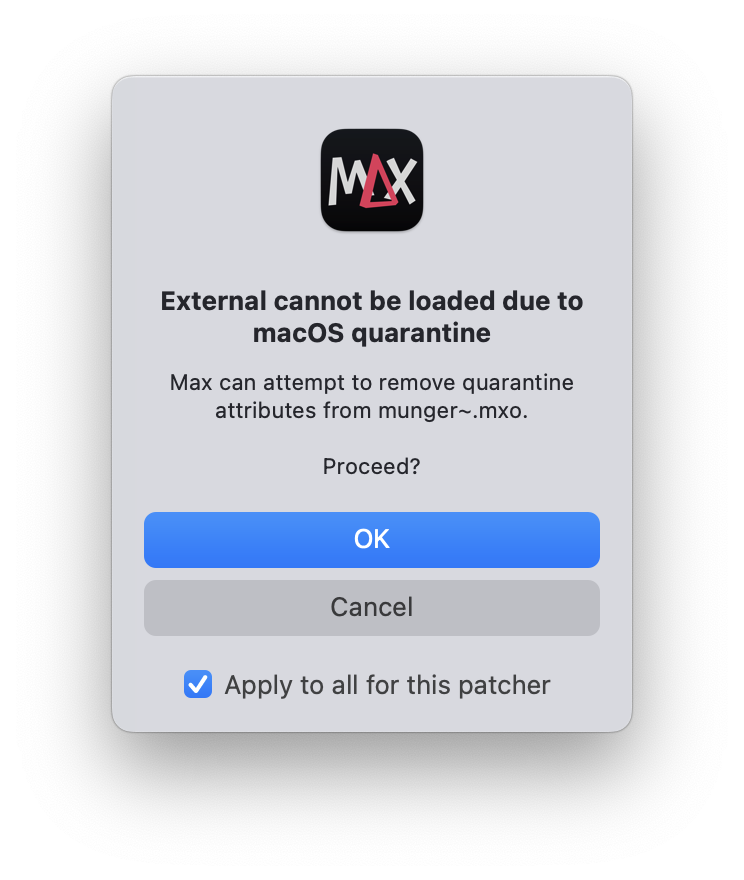 Sans souciNo worries
« External cannot be loaded due to macOS quarantine »
Fenêtre affichée par Max. Cliquez sur OK, et cochez « Apply to all for this patcher » pour ne plus être embêté. C'est tout.
Shown by Max. Click OK and tick "Apply to all for this patcher" so it won't ask again. That's it.
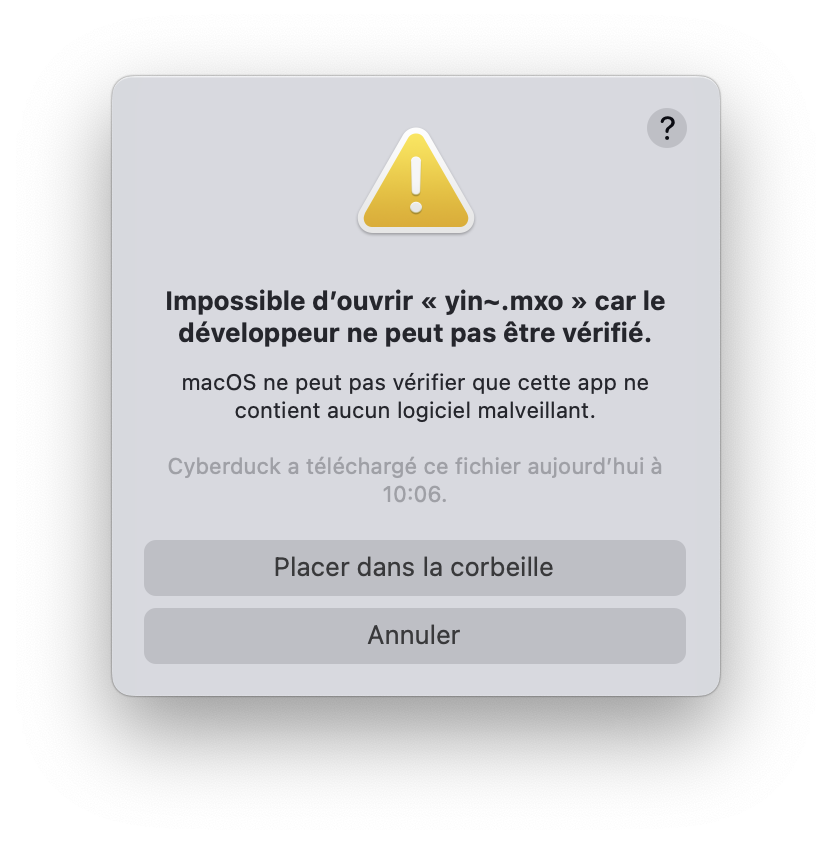 AttentionCareful
« … le développeur ne peut pas être vérifié »
"… the developer cannot be verified"
Fenêtre de macOS. Ne cliquez PAS sur « Placer dans la corbeille ». Cliquez sur Annuler, puis : menu Pomme → Réglages Système → Confidentialité et sécurité, descendez tout en bas et cliquez sur « Ouvrir quand même ».
Shown by macOS. Do NOT click "Move to Trash". Click Cancel, then: menu → System Settings → Privacy & Security, scroll to the bottom and click "Open Anyway".
2. La méthode rapide : tout débloquer d'un coup
2. The fast way: unblock everything at once
Pour éviter de cliquer « Ouvrir quand même » une dizaine de fois, une seule commande suffit. Ouvrez le Terminal (Applications → Utilitaires → Terminal), tapez le début de la commande ci-dessous suivi d'un espace, puis glissez-déposez le dossier AAI décompressé dans la fenêtre du Terminal (le chemin se colle tout seul) et appuyez sur Entrée :
To avoid clicking "Open Anyway" a dozen times, one command does it all. Open Terminal (Applications → Utilities → Terminal), type the start of the command below followed by a space, then drag and drop the unzipped AAI folder into the Terminal window (the path pastes itself) and press Enter:
xattr -dr com.apple.quarantine Plus aucun des deux popups n'apparaîtra ensuite.
Neither popup will appear after that.
3. Sur un Mac récent (puce Apple) : lancer Max en Rosetta
3. On a recent Mac (Apple chip): run Max in Rosetta
Plusieurs traitements d'AAI (chorus, flanger, phasor, overdrive, saturation, fuzz, distorsion, reverbs Darkhall et Prism, transpositions…) reposent sur des objets encore compilés pour processeurs Intel. Sur les Mac Apple Silicon (M1, M2, M3…), ils ne se chargent que si Max est lancé en mode Rosetta :
Several AAI effects (chorus, flanger, phasor, overdrive, saturation, fuzz, distortion, Darkhall and Prism reverbs, transpositions…) rely on objects still compiled for Intel processors. On Apple Silicon Macs (M1, M2, M3…), they only load if Max is launched in Rosetta mode:
- Quittez Max s'il est ouvert.
- Quit Max if it's open.
- Dans le Finder, ouvrez le dossier Applications et sélectionnez Max (un simple clic).
- In Finder, open the Applications folder and select Max (single click).
- Menu Fichier → Lire les informations (ou
Cmd + I). - Menu File → Get Info (or
Cmd + I). - Cochez la case « Ouvrir avec Rosetta ».
- Tick the "Open using Rosetta" checkbox.
- Relancez Max, puis ouvrez AAI. Les traitements se chargent normalement.
- Relaunch Max, then open AAI. The effects now load normally.
À noter : Apple retire progressivement Rosetta (avertissements depuis macOS 26.4, arrêt complet prévu avec macOS 28, à l'automne 2027). Cette solution fonctionne aujourd'hui ; si vous rencontrez un souci, n'hésitez pas à me contacter.
Note: Apple is phasing Rosetta out (warnings since macOS 26.4, full removal planned with macOS 28 in autumn 2027). This solution works today; if you run into trouble, feel free to get in touch.

Boîte à outils
Toolbox
Traitements audio — version 4
Audio effects — version 4
Une trentaine de modules de transformation, regroupés par famille.
Around thirty transformation modules, grouped by family.
Hauteur
Pitch
Rythme / temps
Rhythm / time
Modulation
Timbre / texture
Espace
Space
Repère pédagogique : je regroupe habituellement les effets en six grandes catégories musicales — hauteur, rythme, modulation, timbre, dynamique et espace. AAI en couvre cinq ; la famille des dynamiques (compresseur, limiteur, gate…) n'est pas incluse.
Teaching note: sound effects are usually grouped into six broad musical categories — pitch, rhythm, modulation, timbre, dynamics and space. AAI covers five of them; the dynamics family (compressor, limiter, gate…) is not included.
Téléchargements
Downloads
Autres versions
Other versions
-
Télécharger DownloadVersion 3.42 « Legacy »Mac 32 bits, Windows 32/64. Permet de faire tourner une version récente sur des parcs d'ordinateurs Mac assez anciens.Mac 32-bit, Windows 32/64. Runs a recent version on older Mac computers.
-
Télécharger DownloadDernière version 3 (3.64)Latest version 3 (3.64)Mac 64 bits, Windows 32/64. Dernière version compatible Max 8.Mac 64-bit, Windows 32/64. Last version compatible with Max 8.
-
Télécharger DownloadVersion MultimicrosMultimicros versionMac 64 bits, Windows 32/64. Remplace les fichiers son par des entrées micro supplémentaires.Mac 64-bit, Windows 32/64. Replaces the sound files with additional microphone inputs.
Versions précédentes
Previous versions
Version 2.0 (Mac Patch) · Version 1.5 (Mac Application) · toutes les versions.
Version 2.0 (Mac Patch) · Version 1.5 (Mac Application) · all versions.
Ressources
Resources
Documentation
Documentation
Documentation v4 : en cours de rédaction.
Documentation v4: in progress.
Anciennes documentations (versions 2–3) : Documentation (2013) · Update (2014).
Older documentation (versions 2–3): Documentation (2013) · Update (2014).
Contact
Contact
À propos
About
N'hésitez pas à me contacter pour toute demande de correction de bug ou de feature request, à gregoirelorieux [at] gmail [dot] com.
Feel free to contact me for any bug report or feature request, at gregoirelorieux [at] gmail [dot] com.